FBR Login & Profile Update Pakistan – Complete Guide 2026
Introduction
FBR Login and Profile Update are essential parts of managing your tax profile in Pakistan. Every registered taxpayer should regularly access their account through the FBR IRIS Portal and ensure that all personal and business information is accurate and up to date.
Outdated profile details can lead to filing errors, delays in Active Taxpayer List (ATL) status, compliance issues, and even FBR notices. Keeping your profile updated helps maintain a smooth tax filing experience and ensures accurate communication with tax authorities.
This guide explains the FBR login process, profile update procedure, common issues, and best practices for maintaining an accurate tax record.
What Is FBR Login?
FBR Login is the process of accessing your tax account through the IRIS Portal using your CNIC and password.
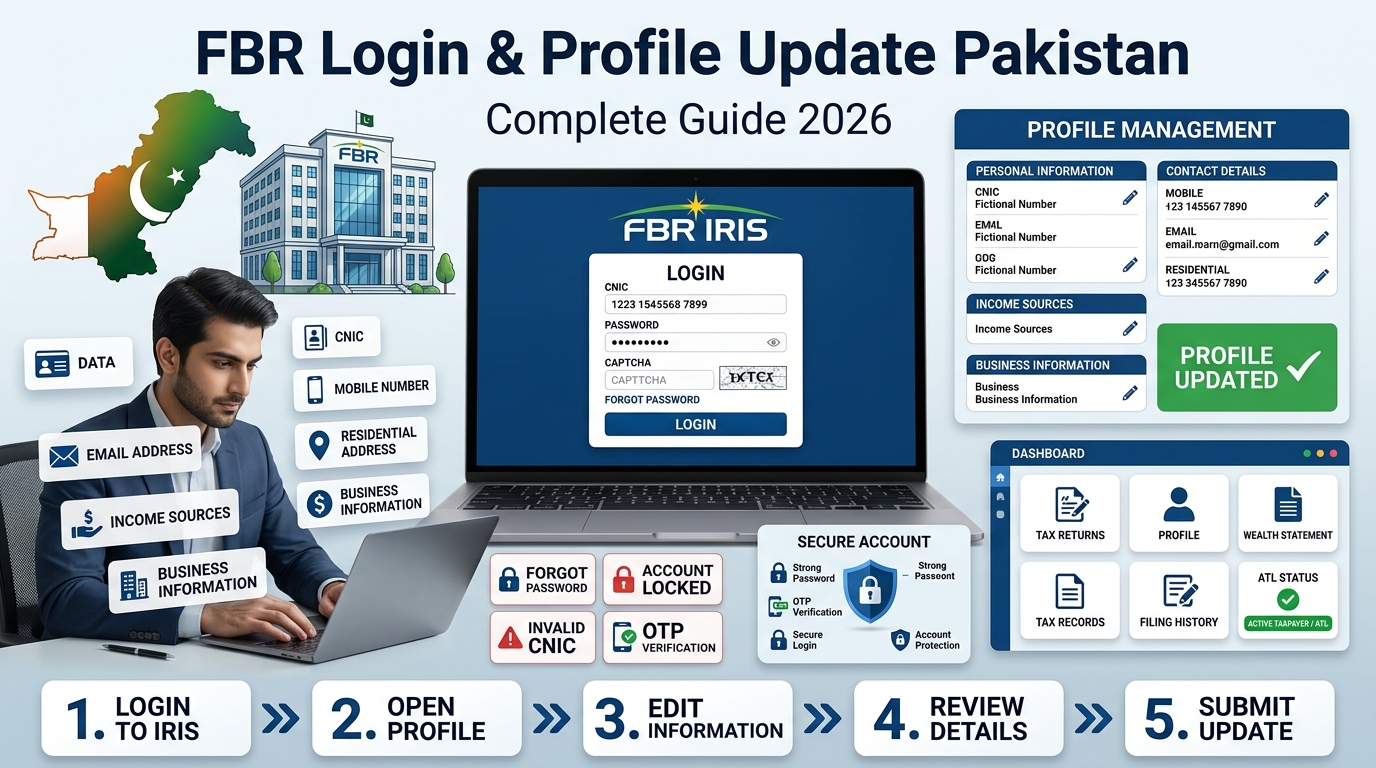
Once logged in, taxpayers can:
- File tax returns
- Update profile information
- View notices and correspondence
- Check tax records
- Manage wealth statements
- Access filing history
In simple terms, the FBR login system gives you complete control over your tax profile.
What Is an FBR Profile Update?
An FBR Profile Update refers to modifying or correcting information in your IRIS account.
This may include:
- Residential address
- Mobile number
- Email address
- Income source details
- Business information
- Contact details
Keeping this information current helps ensure that your tax records remain accurate and compliant.
Why Is FBR Login and Profile Update Important?
Maintaining an updated profile provides several benefits.
Key Advantages
- Prevents unnecessary FBR notices
- Ensures accurate tax calculations
- Supports smooth tax return filing
- Helps maintain ATL status
- Improves banking compliance
- Assists with business verification processes
Incorrect information can create complications during filing and financial transactions.
How to Log In to the FBR IRIS Portal
Step 1: Visit the IRIS Portal
Open the official FBR IRIS website and navigate to the login page.
Step 2: Enter Your Credentials
Provide:
- CNIC number
- Password
Step 3: Complete Security Verification
Enter the captcha code displayed on the screen.
Step 4: Access Your Dashboard
After successful verification, you will be redirected to your taxpayer dashboard.

How to Update Your FBR Profile
Step 1: Open Profile Management
After logging in, navigate to the Profile Management section.
Step 2: Select Information to Update
You may update:
- Personal information
- Contact details
- Residential address
- Income sources
- Business information
Step 3: Make Necessary Changes
Carefully review and edit the required fields.
Step 4: Submit the Updated Information
Submit your changes and wait for system confirmation.
Common Profile Updates
Mobile Number Update
A valid mobile number is required for OTP verification and important notifications.
Email Address Update
Your email address is used for official communication and account recovery.
Address Update
Current address information helps maintain accurate tax records.
Business Information Update
Business owners should update any changes related to business activities or registration details.
Common FBR Login Issues
Forgot Password
This is one of the most common login problems.
Solution: Use the “Forgot Password” option and follow the OTP verification process.
Account Locked
Multiple unsuccessful login attempts may temporarily lock your account.
Solution: Wait for the lock period to end or contact the FBR support team.
Invalid CNIC Error
This usually occurs when incorrect login credentials are entered.
Solution: Verify your CNIC number and try again.
Why Accurate Profile Information Matters
Incorrect profile details may result in:
- Tax return processing issues
- Delays in ATL status updates
- Compliance notices from FBR
- Banking verification problems
- Legal and administrative complications
Regular profile reviews can help prevent these issues.
Security Tips for FBR Accounts
Follow these best practices to protect your account:
- Never share your password
- Use a strong and unique password
- Change your password periodically
- Keep your email address active
- Monitor account activity regularly
Frequently Asked Questions
Can I change my CNIC in the FBR profile?
No. Your CNIC serves as your taxpayer identification and cannot be changed through profile updates.
Is FBR login free?
Yes. Accessing the IRIS Portal is completely free.
Why is my profile update rejected?
Updates may be rejected because of incomplete, inaccurate, or unsupported information.
How often should I update my profile?
You should update your profile whenever your personal, contact, or business information changes.
Final Thoughts
FBR Login and Profile Update play a vital role in maintaining an accurate tax profile in Pakistan. Updated information helps ensure smooth tax filing, active ATL status, and efficient communication with tax authorities.
By reviewing your profile regularly and correcting outdated information promptly, you can avoid unnecessary complications and maintain full compliance with FBR requirements.
Helpful Resources
- FBR Official Website: https://fbr.gov.pk
- IRIS Portal: https://iris.fbr.gov.pk
- Active Taxpayer List (ATL): https://atl.fbr.gov.pk
- SECP Pakistan: https://www.secp.gov.pk